
YouTube has become a legitimate income source for millions of creators worldwide, and the United States remains the most lucrative market for content monetization. But here’s the reality that most creators don’t understand: not all views are created equal. Your earnings don’t just depend on how many people watch your videos—they depend on *who* watches them and *where* those viewers are located.
In 2026, the United States continues to dominate YouTube ad spending, generating the highest CPM (Cost Per Mille) and RPM (Revenue Per Mille) rates globally. Yet most creators are flying blind when it comes to understanding their actual earning potential. A creator in the finance niche might earn 6 times more per thousand views than a lifestyle creator, and they wouldn’t even know it. The US video ad market has grown to unprecedented levels, with major brands allocating billions in digital advertising budgets specifically to YouTube placements. This creates a unique opportunity for creators who understand how RPM works and which niches command premium rates.
Your YouTube RPM directly determines whether creating content is a side hustle or a full-time income. This article breaks down exactly what you can expect to earn in 2026, shows you which niches pay the most, and reveals the strategies top earners use to maximize their revenue. By the end, you’ll have a clear picture of your earning potential and actionable steps to increase it.
What Is YouTube RPM and How Does It Differ From CPM?
YouTube RPM and CPM are two metrics that often confuse creators, but understanding the difference is critical to properly evaluating your earnings potential. Let’s clarify both concepts so you can make informed decisions about your channel strategy.
CPM (Cost Per Mille) is what advertisers pay YouTube for every thousand impressions of their ads. If an advertiser has a CPM of $5, they pay YouTube $5 for every 1,000 times their ad is displayed. This is the advertiser’s cost. RPM (Revenue Per Mille), on the other hand, is what YouTube actually pays *you* as a creator for every thousand monetized views. RPM is always lower than CPM because YouTube takes a cut—typically 45% of the ad revenue—leaving creators with about 55%.
So if the CPM in your niche is $10, your RPM might be around $5.50 after YouTube’s cut. But there’s more complexity here. Your RPM also factors in non-monetized views (videos that don’t show ads), so the actual calculation is more nuanced than just multiplying CPM by 0.55.
The practical formula is simple:
Total Revenue = (RPM ÷ 1,000) × Total Views
If you have 100,000 views and an RPM of $8, you earn $800. If your RPM is $15, you earn $1,500 for the same views. This is why understanding your specific RPM is so important.
In the United States specifically, RPM rates are the highest in the world due to several factors: strong advertiser demand, high-value audiences, spending power of US viewers, and strict ad quality standards. The US market commands premium rates that creators in other countries simply cannot achieve, even with similar content quality and audience engagement.
Average YouTube RPM Rates in the United States for 2026
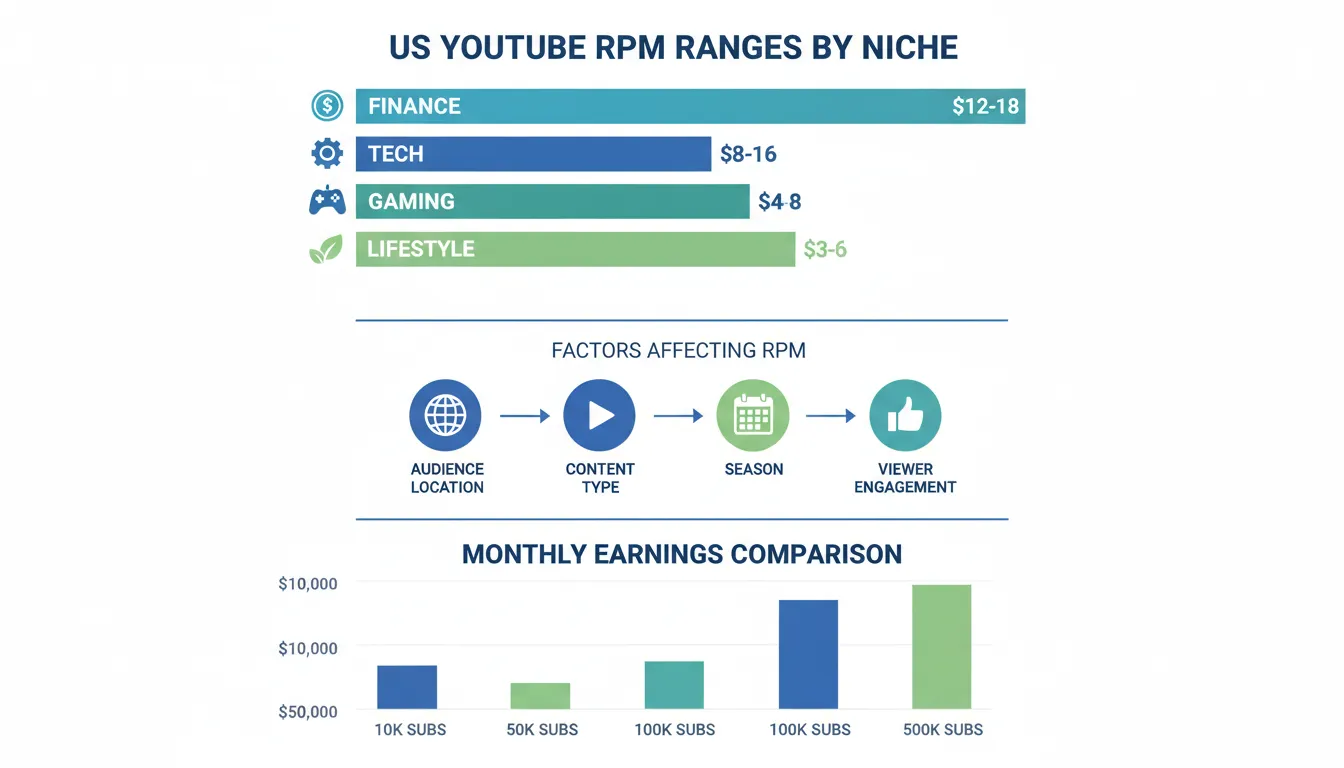
The average YouTube RPM in the United States for 2026 ranges between $3 and $18 per thousand views, but this broad range masks critical differences between content niches. Understanding where your channel fits in this spectrum is essential for accurate income projections.
| Niche | Avg RPM USA 2026 | Top Advertiser Categories |
|---|---|---|
| Finance & Investing | $12–$40 | Banks, brokerages, fintech, credit cards |
| Insurance | $18–$45 | Auto, home, life, health insurance providers |
| Legal | $15–$35 | Personal injury law firms, legal services |
| Real Estate | $10–$25 | Realtors, mortgage lenders, property platforms |
| SaaS / Tech | $10–$22 | B2B software, cloud platforms, developer tools |
| Education | $8–$18 | Online courses, university ads, tutoring |
| Health & Medical | $8–$15 | Telehealth, pharma, supplements |
| Food & Lifestyle | $5–$12 | Grocery, meal kits, CPG brands |
| Gaming | $2–$6 | Low CPM globally — high volume, low conversion |
General US YouTube RPM Benchmarks by Niche:
– Finance & Investment: $12–$18+ per 1,000 views
– Technology & Software: $8–$16 per 1,000 views
– Business & Entrepreneurship: $10–$15 per 1,000 views
– Health & Medical: $8–$14 per 1,000 views
– Professional Development: $8–$12 per 1,000 views
– Gaming: $4–$8 per 1,000 views
– Entertainment & Vlogging: $3–$6 per 1,000 views
– Lifestyle & Beauty: $4–$7 per 1,000 views
– Sports: $5–$9 per 1,000 views
– Food & Cooking: $3–$7 per 1,000 views
These rates represent significant variations. A finance creator with 100,000 monthly views could earn $1,200–$1,800, while an entertainment creator with the same views might earn only $300–$600. This 3–6x difference in earning potential is why niche selection matters deeply for monetization.
Why Finance and Tech Earn More:
Finance and technology niches command premium RPM rates because advertisers in these sectors have higher budgets and target high-income audiences. A credit card company, investment app, or software company is willing to pay more for clicks from viewers interested in finance because their customers have significant purchasing power. Additionally, these industries have higher customer lifetime value, which justifies higher advertising spend per impression.
Seasonal Fluctuations in 2026:
YouTube RPM is not static throughout the year. Rates typically follow this pattern:
– November–December: Highest RPM (holiday season advertising budget surge)
– January–February: Second highest (New Year resolutions, tax season)
– March–October: Moderate, with summer dips (July–August typically lower)
– September: Recovery period as advertisers return to school season campaigns
Experienced US creators report seeing their RPM jump 20–40% during Q4 (October–December) compared to summer months. Planning your content calendar around these patterns can significantly impact annual earnings.
How to Check Your YouTube RPM in AdSense
Your actual RPM is visible in real-time through your YouTube AdSense dashboard. This is where you see exactly what YouTube is paying you, not theoretical estimates. Checking this regularly helps you track performance and identify trends.
Step 1: Access YouTube Studio
Log into your YouTube account and click on the user profile icon in the top right corner. Select “YouTube Studio” from the dropdown menu. You’ll be taken to the YouTube Studio dashboard, which serves as your command center for channel analytics and monetization data.
Step 2: Navigate to the Earnings Tab
In the left sidebar menu, locate and click on “Monetization” (it may appear under “Earn” or “Growth” depending on your YouTube version). This section contains all your earnings-related metrics, including AdSense integration details and revenue reports.
Step 3: Find the Revenue Report
Under the Monetization section, look for “Revenue” or “Earnings Report.” This page displays your total earnings, but you need to go deeper to see RPM specifically. Click on “Detailed Revenue Report” or navigate to your AdSense account for granular data.
Step 4: Check Your AdSense Dashboard
For the most detailed RPM breakdown, you’ll want to visit your AdSense account directly (www.adsense.google.com). Here you can see:
– Exact RPM and CPM for each day
– RPM broken down by geography (US vs. international viewers)
– RPM trends over time
– Which videos generated which RPM rates
Step 5: Analyze by Video
In YouTube Studio, you can see the RPM for individual videos. Go to the “Analytics” tab, then click on “Revenue” to see earnings per video. This reveals which content types, titles, or topics generate higher RPM for your specific audience.
Tips for Interpreting Your RPM Data:
Don’t fixate on day-to-day fluctuations. YouTube RPM can vary significantly day-to-day based on advertiser demand, viewer behavior, and numerous other factors. Instead, track your 30-day and 90-day averages for more reliable data. A video that gets 5,000 views on a Monday might have a different RPM than 5,000 views on a Saturday when advertiser competition is lower.
Also note that YouTube only shows AdSense data with a 2–3 day delay, so you’re never seeing real-time RPM. The RPM you see today reflects mostly yesterday’s performance.
Key Takeaways
Key Factors That Affect Your US YouTube RPM in 2026
Your RPM isn’t random. It’s driven by specific, measurable factors that you can influence. Understanding these factors is the key to optimization.
1. Your Content Niche and Topic
As mentioned earlier, content category is the primary driver of RPM variation. Advertisers are willing to pay premium rates for audiences interested in high-value topics. Finance, B2B, professional services, and technology consistently outperform entertainment, lifestyle, and hobby content.
If you’re in a lower-RPM niche, you have a choice: stick with your passion and accept lower earnings, or strategically branch into higher-RPM topics. Many successful creators create content across multiple niches—a gaming channel might add videos about tech equipment reviews, for example, which attracts a different advertiser base willing to pay more.
2. Geographic Location of Your Viewers
YouTube’s algorithm doesn’t care about viewer location, but advertisers certainly do. US viewers generate the highest RPM globally, followed by Canada, UK, Australia, and Western Europe. Asian, Latin American, and African viewers typically generate 50–80% lower RPM despite identical view counts.
If 80% of your audience is from the US and 20% is international, your overall RPM will be higher than a creator with 50% US and 50% international audiences. You can see your audience geography breakdown in YouTube Analytics under the “Audience” tab. Some creators strategically tailor their content and thumbnails to appeal to US audiences specifically to maximize RPM.
3. Video Length and Monetization Placement
Longer videos can carry more ads (pre-roll, mid-roll, and post-roll), generating more total revenue. However, RPM (revenue per thousand views, not total revenue) is more influenced by viewer engagement and watch time quality than video length.
Videos that keep viewers watching longer attract more advertiser-friendly engagement signals, which can improve CPM rates and thus RPM. A well-paced 12-minute video that holds attention thoroughly might generate better RPM than a poorly edited 25-minute video with high drop-off rates.
4. Audience Engagement and Click-Through Rates
YouTube’s algorithm rewards videos with high engagement, and advertisers prefer placements on engaging content. Videos with strong likes, comments, and shares ratios signal quality to the algorithm and to advertisers, potentially commanding higher CPM rates and thus higher RPM.
Channels that encourage comments, create community posts, and foster interaction often see higher RPM than channels with passive audiences. This is one reason why community-building is critical for maximizing earnings beyond just raw view counts.
5. Seasonality and Advertiser Demand
As discussed earlier, advertiser budgets fluctuate seasonally. Q4 is prime advertising season (40–50% higher RPM than summer months), while July–August typically see the lowest RPM. January sees a secondary peak due to New Year resolution advertising and tax season services.
Smart creators know to expect lower earnings in summer and plan their finances accordingly. If you’re heavily dependent on YouTube revenue, understanding these patterns helps with budgeting and cash flow management.
6. Account Age, Channel Authority, and History
YouTube’s algorithm and advertiser preferences favor established channels. A channel with consistent uploads, strong subscriber base, and proven audience loyalty typically commands higher RPM than a brand-new channel with sporadic content. This is partly because established channels have better audience data available to advertisers, allowing for more targeted campaigns and thus higher advertiser bids.
New channels should expect lower RPM initially, with rates improving as the channel matures, subscriber count grows, and historical performance data accumulates.
7. Content Compliance and Brand-Safe Signals
Videos with controversial topics, swearing, or borderline content generate lower RPM because fewer advertisers want placement on such content. Channels with strong brand-safe signals (clean language, no controversy, professional presentation) attract premium advertisers willing to pay higher CPM rates.
This doesn’t mean you must create sanitized content, but understand that edgy content comes with a financial penalty in terms of RPM.
Real-World Earnings Examples: What Creators Actually Make in 2026
Theory is helpful, but concrete examples ground understanding. Here are realistic income scenarios for different creator types in the US market in 2026.
| Channel Type | Monthly Views | Avg RPM | Monthly AdSense |
|---|---|---|---|
| Finance / Investing | 50,000 | $22 | ~$1,100/mo |
| Legal / Business | 30,000 | $28 | ~$840/mo |
| Lifestyle / Vlog | 300,000 | $8 | ~$2,400/mo |
| Gaming | 1,000,000 | $3 | ~$3,000/mo |
Example 1: Finance Education Channel
– Monthly views: 250,000
– Average RPM: $14
– Monthly gross revenue: (14 ÷ 1,000) × 250,000 = $3,500
– Annual earnings: $42,000 (not including sponsorships or affiliate revenue)
This creator focuses on personal finance, investing, and passive income strategies. High RPM because advertisers (investment apps, credit card companies, insurance providers) bid aggressively for this audience.
Example 2: Gaming Channel
– Monthly views: 500,000
– Average RPM: $6
– Monthly gross revenue: (6 ÷ 1,000) × 500,000 = $3,000
– Annual earnings: $36,000
This channel has double the views of the finance channel but earns less annually. Gaming requires more views to hit equivalent revenue due to lower RPM. However, gaming channels often have higher sponsorship and merchandise opportunities, which can offset lower RPM.
Example 3: Tech Product Reviews
– Monthly views: 150,000
– Average RPM: $12
– Monthly gross revenue: (12 ÷ 1,000) × 150,000 = $1,800
– Annual earnings: $21,600
A smaller tech channel with higher RPM than most niches. This creator also does affiliate marketing for tech products (Amazon Associates, manufacturer programs), adding another $500–$800 monthly in revenue, bringing total to around $30,000+ annually.
Example 4: Lifestyle and Entertainment
– Monthly views: 400,000
– Average RPM: $5
– Monthly gross revenue: (5 ÷ 1,000) × 400,000 = $2,000
– Annual earnings: $24,000
High view count but moderate RPM. This creator compensates through brand deals and sponsorships, which can add 50–200% more revenue on top of AdSense earnings.
Example 5: Professional Development and Career Coaching
– Monthly views: 80,000
– Average RPM: $11
– Monthly gross revenue: (11 ÷ 1,000) × 80,000 = $880
– Annual earnings: $10,560
A smaller channel but with premium RPM. This creator is building personal brand authority and uses YouTube as a funnel to sell courses and consulting services, where the real revenue lies (often 5–10x YouTube earnings).
These examples show that view count alone doesn’t determine earnings. A 150,000-view tech channel might out-earn a 500,000-view gaming channel because of niche differences. Strategic niche selection matters as much as growth strategy.
Tools and Resources for Tracking and Optimizing Your RPM
Several tools and platforms can help you monitor, analyze, and optimize your YouTube RPM in 2026.
YouTube Studio Native Tools (Free)
– Revenue Report: Your primary dashboard for RPM and CPM data
– Analytics > Revenue Tab: Detailed earnings by video and date
– Audience Geography: See which countries your viewers come from
– Video Performance Reports: Identify which videos generate highest RPM
Cost: Free (included with YouTube monetization)
Google AdSense Dashboard (Free)
–
Advertisement