

“`json
“`
The freelance economy is booming. A whopping 35% of the global workforce engages in freelance work, and that number keeps climbing. But here’s the problem: with hundreds of platforms claiming to be the “best,” how do you know which one will actually put money in your pocket?
The platform you choose makes a massive difference. Some take 5% commission. Others take 50%. Some pay weekly. Others take 30 days. Some have consistent work. Others are ghost towns. Picking the wrong platform wastes weeks of effort building your profile only to discover nobody’s hiring.
This guide cuts through the noise. We’ve analyzed 15+ freelancing platforms—looking at real commission fees, payment speeds, user ratings, and what kinds of jobs actually exist on each one. Whether you’re a writer, designer, developer, or virtual assistant, you’ll find the exact platform where you can start earning money immediately in 2026.
What Are Freelancing Platforms and Why They Matter
Freelancing platforms are online marketplaces that connect clients needing work done with freelancers offering their skills. Think of them as the middleman between you and your income.
These platforms are the backbone of the modern gig economy. They eliminate the need for traditional employment while providing the infrastructure to find clients, complete projects, handle payments, and build your reputation. Without them, you’d be cold-emailing strangers and crossing your fingers for payment.
Why they matter:
– Instant access to clients: No networking required. Thousands of potential employers browsing right now.
– Built-in trust system: Reviews and ratings protect both you and clients.
– Guaranteed payment: Platforms hold escrow funds so you don’t get stiffed.
– Professional appearance: A complete profile on a major platform looks more legitimate than a personal website alone.
– Variety of work: You can test different types of jobs to see what pays best.
In 2026, the freelancing landscape is more crowded than ever—but also more sophisticated. Better platforms with smarter matching algorithms have emerged. Competition is fiercer, but so is the pay for quality freelancers.
The catch? You need to pick the right platform for your specific skills. A platform perfect for writers is terrible for developers. One great for designers might have zero web development gigs. This is why most successful freelancers use 3-5 platforms simultaneously.
Top 5 Freelancing Platforms Dominating in 2026
1. Upwork: The Heavyweight Champion
Commission: 5-20% (tiered based on earnings)
Payment: Weekly (Wednesday)
Best for: Developers, writers, designers, virtual assistants
Upwork remains the king of freelancing platforms. In 2026, it hosts over 18 million freelancers and 5 million active clients. The platform brought in $300+ million in annual revenue, meaning there’s serious money flowing through it.
Here’s what makes Upwork essential:
Strengths:
– Largest client base. More jobs = more opportunities.
– Tiered commission system rewards long-term earnings. Your first $500 is 20% commission. Once you hit $500, it drops to 10%. At $10,000, it drops to 5%.
– Strong protection for freelancers. If a client disputes work, Upwork sides with evidence.
– “Connects” system forces you to be selective (you get 40 monthly connects; each job application uses 1-6 connects).
Weaknesses:
– High competition. A simple writing gig might get 100 applications.
– Upwork takes a cut on top of platform fees. Payment processor fees apply.
– Requires investment. You must buy “connects” to apply for jobs if you run out.
– Takes 14 days to withdraw payment after project completion.
Real earning potential: Writers earn $25-$100 per hour. Developers earn $50-$150+ per hour. Designers: $40-$125 per hour.
2. Fiverr: The Gig Economy Giant
Commission: 20% flat
Payment: Within 14 days of delivery
Best for: Quick gigs, designers, writers, social media managers
Fiverr flipped the traditional freelancing model. Instead of clients posting jobs, you create “gigs”—fixed-price services you offer. A client buys what you’re selling.
This is brilliant for certain freelancers and terrible for others.
Strengths:
– No bidding wars. You set your price once.
– Passive income potential. One gig can get hundreds of orders.
– Lower barrier to entry. You can start with just $5 gigs to build reviews.
– Larger gigs can scale. You set your own hours and take on as much work as you want.
– Video portfolio showcases your work beautifully.
Weaknesses:
– 20% commission is brutal. You earn $80 on every $100 gig.
– Race to the bottom. Fiverr attracts price-conscious buyers. You compete on cost, not quality (though top-rated sellers can command premium prices).
– Payment takes 14 days minimum, sometimes up to 30.
– Algorithm favors new gigs. You have to constantly refresh content.
– Returns can be unpredictable. Some gigs flop. Others generate consistent income.
Real earning potential: Budget sellers earn $100-$300/month. Established sellers with multiple gigs earning $1,000-$5,000+/month. Top creators: $10,000+/month.
3. Toptal: Premium Quality Only
Commission: 10% ongoing
Payment: Weekly (Tuesday)
Best for: Elite developers, designers, finance professionals
Toptal is intentionally exclusive. They reject 98% of applicants. This means if you get accepted, you’re competing against only the top 2% of freelancers worldwide.
This creates a completely different market dynamic.
Strengths:
– Top clients. Amazon, Airbnb, Google actively hire here.
– Higher rates. Developers average $80-$150 per hour.
– Less competition. Only 2% acceptance rate means fewer applications per job.
– Guaranteed interview process. You’re matched based on skill fit, not bidding.
– Premium positioning. Clients on Toptal expect to pay for quality.
Weaknesses:
– Extremely difficult to get accepted. Application + test + interview process takes weeks.
– 10% commission is lower than others, but clients pay more upfront.
– Not for beginners or casual freelancers.
– Fewer total jobs available compared to Upwork (but higher-quality jobs).
Real earning potential: Minimum $80/hour. Most earn $100-$200+/hour. Top talent: $200-$400/hour possible.
4. Freelancer.com: The Underdog Growing Fast
Commission: 10% ongoing (5% for higher tiers)
Payment: Weekly (Friday)
Best for: Designers, developers, writers, marketers
Freelancer.com is often overlooked compared to Upwork and Fiverr, but it’s genuinely growing. In 2026, they’ve pushed hard on AI-matching and have over 65 million users globally.
Strengths:
– Lower commission than Fiverr (10% vs 20%).
– Wider variety of job categories. From coding to writing to data entry.
– Less saturated than Upwork in many categories.
– Weekly payments available.
– Contest feature: You can compete with others on design or writing projects for a fee.
Weaknesses:
– Lower payment protections than Upwork.
– Smaller client base (though growing).
– Quality is inconsistent. Lots of low-ball offers.
– Escrow system less sophisticated than competitors.
Real earning potential: Highly variable. Budget: $500-$2,000/month. Mid-tier: $2,000-$5,000/month.
5. Guru: The Specialized Alternative
Commission: 9% flat
Payment: Weekly (Thursday)
Best for: Specialized services, long-term contracts, professionals
Guru attracts quality clients willing to pay for expertise. Their model emphasizes long-term relationships over one-off gigs.
Strengths:
– 9% commission is competitive.
– Invitation-only jobs (once you establish yourself).
– Flexible pricing models (hourly, project, retainer).
– Good for building long-term client relationships.
– Less competition in niche categories.
Weaknesses:
– Smaller platform overall. Fewer job listings.
– Requires building reputation before seeing premium gigs.
– Slower growth than Upwork or Fiverr.
Real earning potential: $20-$100/hour depending on category.

Emerging Platforms Worth Your Attention in 2026
PeoplePerHour: Designer Paradise
Commission: 20% (can negotiate lower)
Best for: Designers, developers, creative professionals
PeoplePerHour started in the UK and is now global. It’s been growing 40% year-over-year. The platform attracts higher-quality projects than you might expect for its size.
Why consider it: Lower competition than Upwork in many design categories. Clients here actively seek quality. The platform takes a smaller cut on retainer contracts (as low as 10%).
Reality check: Fewer total jobs available. You’ll need solid experience to land consistent work.
Twine: For the Selective
Commission: 8%
Best for: Thoughtful freelancers, long-term work
Twine bills itself as “for people who care about their work.” Freelancers answer a detailed questionnaire about their values and expertise. Clients do the same. The platform matches based on alignment, not just skill.
Why consider it: Genuinely different business model. You’re not competing on price or racing to apply first. Matches are intentional. Payment weekly.
Reality check: Much smaller than Upwork. But if you value meaningful work over raw income volume, this is refreshing.
Braintrust: Blockchain-Based Alternative
Commission: 0% (they claim)
Best for: Developers, designers, creative professionals
Braintrust uses blockchain technology to take the middleman out entirely. They charge clients a flat fee instead of taking a cut from freelancers.
Why consider it: Theoretically, 0% commission means you keep everything you earn. No escrow fees. No processing fees. Direct payments.
Reality check: Still relatively new. Fewer clients than established platforms. Payment system is less proven. Tech-forward but riskier.
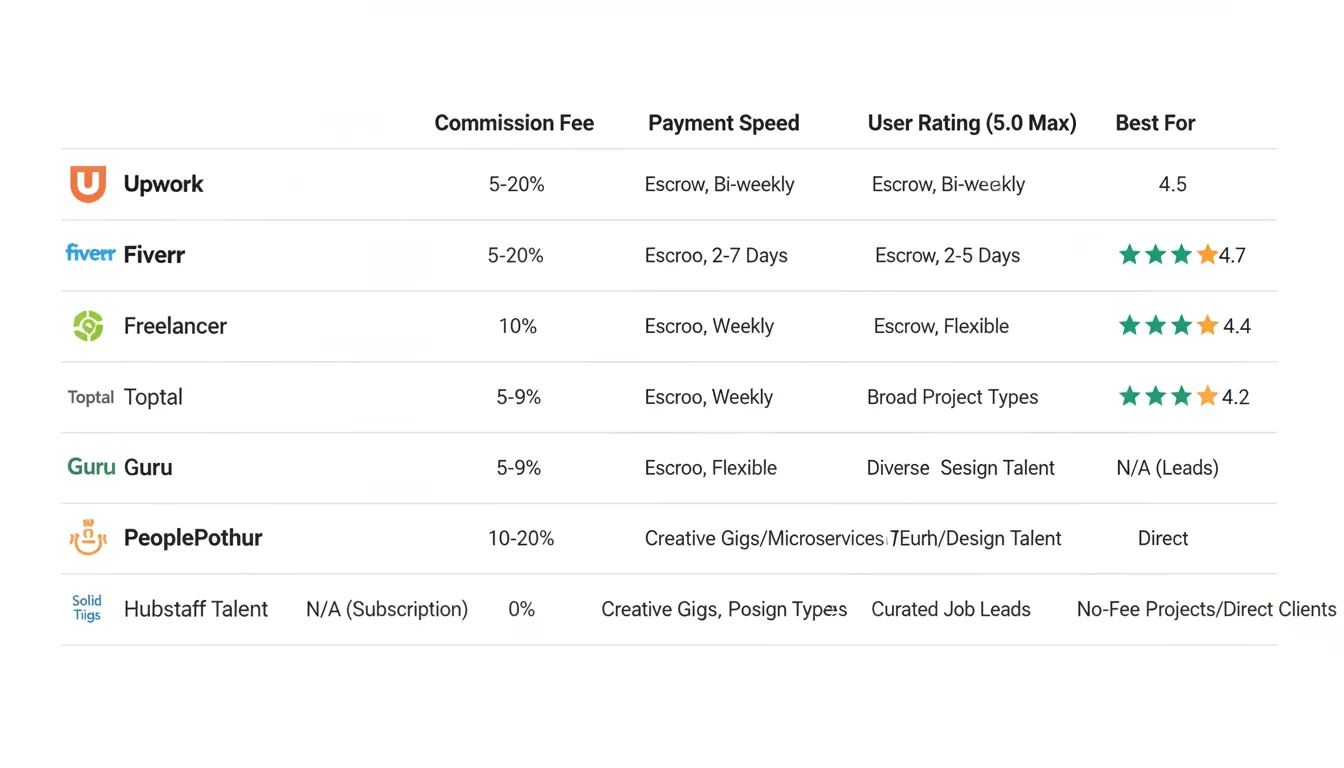
Key Takeaways
Niche Platforms for Specific Skills
If you have specialized skills, niche platforms might pay better than general marketplaces:
| Skill | Best Platform | Why |
|——-|—————|—–|
| Writing | ProBlogger, Scribd | Clients are specifically hiring writers, not shopping around |
| Graphic Design | 99designs, DesignCrowd | Contests showcase your work; repeat clients return |
| Video Editing | Pond5, Shutterstock | Passive income from selling templates and clips |
| Translation | Gengo, Rev | Consistent demand, reasonable rates |
| Virtual Assistant | Belay, Time Etc | Premium clients, often retainer-based |
| Web Development | Gun.io, Gigster | Pre-vetted clients, higher rates |
| Social Media Management | Hootsuite Marketplace, Later | Growing demand, retainer-based work |
| SEO Consulting | Moz, Ahrefs Job Board | Clients searching for expertise, not bargains |

Step-by-Step: How to Choose Your Ideal Freelancing Platform
Step 1: Assess Your Skill Category
First, be ruthlessly honest about what you do. You’re not a “multi-talented entrepreneur.” You’re either a writer, developer, designer, or virtual assistant. Pick one primary category.
Why? Platforms vary wildly by category. A platform perfect for writers might have zero development work. Your skill determines which platform has the deepest job market for what you do.
Questions to ask:
– What’s my primary income skill?
– Which platforms specifically mention this skill prominently?
– Can I see real job postings in my category right now?
Step 2: Test the Application Process
Before committing, apply for 2-3 jobs on your shortlist platforms. Don’t overthink it. Just see what happens.
This reveals critical information:
– How easy is the application? Upwork requires detailed proposals. Fiverr requires none. Which suits you?
– What’s the response rate? Apply for jobs that match your skill level exactly. Track what percentage of applications get responses.
– What are clients actually asking for? Real job descriptions reveal what clients actually want (often different from what you expect).
Expect low response rates on your first applications. That’s normal. You’re building a portfolio.
Step 3: Research Commission Structures
Don’t ignore fees. They compound. A 20% commission on $10,000 annual income costs you $2,000. A 5% commission costs $500. Over a year, this matters.
Create a simple spreadsheet:
| Platform | Commission | Payment Method | Payment Speed | Withdrawal Fees |
|———-|———–|—————–|—————|—————-|
| Upwork | 5-20% tiered | Bank transfer, PayPal, Wise | 14 days | $1.50-$3 |
| Fiverr | 20% flat | PayPal, Wise, direct deposit | 14-30 days | $2 |
| Toptal | 10% ongoing | Bank, PayPal, Wise | Weekly | Varies |
Step 4: Evaluate Client Quality
Client quality varies dramatically. A high-paying job from a sketchy client is worse than a lower-paying job from a reliable repeat customer.
Red flags:
– Extremely low budgets for significant work
– New account with no review history
– Vague job descriptions
– Requests to communicate outside the platform
Green flags:
– Established account (6+ months old minimum)
– Positive reviews from other freelancers
– Detailed, professional job description
– Clear communication
Step 5: Start With 2-3 Platforms Simultaneously
Don’t put all your eggs in one basket. Different platforms attract different clients. Running parallel applications gives you optionality.
But don’t try to manage 10 platforms. That’s chaos. Pick 2-3 for your first 90 days:
1. A major platform (Upwork or Fiverr)
2. A specialized platform for your niche
3. An emerging platform with less competition
Tools, Resources, and Cost Breakdown
Essential Tools to Maximize Earnings
Profile Optimization:
– Grammarly ($12/month): Non-negotiable. Errors kill applications.
– Canva Pro ($13/month): Create professional avatars, headers, portfolio images.
– Loom ($13/month): Record video introductions for clients.
Job Management:
– Zapier (Free-$99/month): Automate job alerts from multiple platforms.
– Spreadsheet (Google Sheets, Free): Track applications, responses, earnings by platform.
– Calendar (Google Calendar, Free): Schedule client meetings and deadlines.
Invoice & Payment:
– Wave ($0): Free invoicing for clients outside platforms.
– Stripe or PayPal ($0.25-3%): Accept payments directly.
Productivity:
– Todoist (Free-$4/month): Task management.
– Time-tracking software (Toggl, $9-19/month): Track hours for hourly contracts.
Cost Breakdown for Getting Started
One-time setup (Month 1):
– Professional profile photography: $50-200 (use Fiverr—ironic, right)
– Domain name
Advertisement
