YouTube Shopping (Affiliate) Setup: Eligibility, Product Tagging, and What Converts
What YouTube Shopping Affiliate Is (and who it’s for)
The YouTube Shopping affiliate program allows eligible creators to tag and promote products within their YouTube content, earning commissions on any resulting sales. This program is designed for creators who want to diversify their income streams and leverage their audience’s interest in the products they use or recommend.
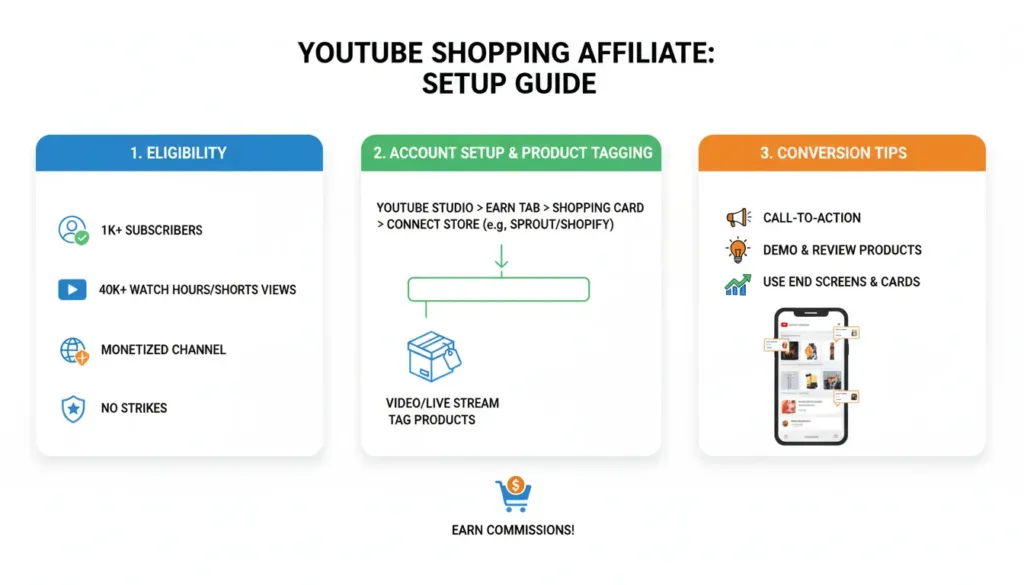
Eligibility checklist (2026)
To be eligible for the YouTube Shopping affiliate program, your channel must meet several criteria:
You must be part of the YouTube Partner Program (YPP), which requires at least 1,000 subscribers and 4,000 watch hours in the past 12 months.
There is a minimum subscriber threshold of 5,000 to access the Shopping feature.
Your channel must be located in one of the supported countries or regions where the program is available.
Your content cannot be designated as “Made for Kids,” and you cannot be a music or Online Advertising Certified (OAC) channel.
Setup steps (from zero to first tagged video)
1. Turn on the feature: Once eligible, you’ll see “Join” or “Shop” options appear in your YouTube Studio dashboard, where you can enable the Shopping feature.
2. Choose products to promote: Select items that are highly relevant to your audience and that you genuinely trust and recommend. Focus on products with good commission rates and strong customer reviews to maximize your earning potential.
3. Add disclosures and keep content advertiser-friendly: Disclose any affiliate relationships and ensure your content meets YouTube’s advertiser-friendly guidelines to minimize risk.
How to tag products (step-by-step)
You can tag products while uploading a new video or by editing an existing one. YouTube’s Help page states that you can tag up to 60 products per video.
The tags will appear as a shopping button, product sticker, or shopping overlay, depending on the video format.
What converts (practical playbook)
Product-choice rules: Match the video intent, whether it’s a tutorial, review, or problem-solving content. For example, if you’re creating a kitchen gadget review video, tag the exact products you’re testing rather than generic alternatives.
Timing: Mention and tag the product at the moment of highest intent, such as during a product demonstration or before/after a key recommendation. This increases the likelihood of viewers clicking through while they’re actively engaged with the product showcase.
Reduce friction: Curate your tags, focusing on fewer, better-performing products rather than random items. Test different products to see which ones resonate best with your audience and drive the highest click-through rates.
Shorts conversion: For YouTube Shorts, stick to one product, one promise, and one clear call-to-action to maximize conversion.
Common problems + fixes
“I don’t see the ‘Tag products’ option”: This could be because you’re not eligible, haven’t been invited to the program, or are in a region where it’s not yet available.
“My product isn’t searchable”: This may be due to catalog availability or issues with your merchant feed. Try choosing an alternative product that is more widely available.
“Low clicks”: Poor intent match, weak product demonstration, or incorrect placement of the tags can all contribute to low conversion rates.
FAQ
How many subscribers do you need for YouTube Shopping?
You need at least 5,000 subscribers to access the YouTube Shopping feature. Note that this is separate from the general 1,000 subscriber requirement for the YouTube Partner Program.
Can you tag products in YouTube Shorts?
Yes, you can tag products in your YouTube Shorts content. This feature works the same way as in regular videos, making it easy to monetize your short-form content.
How many products can you tag per video?
According to YouTube’s Help page, you can tag up to 60 products per video.
Which countries are supported for the YouTube Shopping affiliate program?
The program is currently available in select countries and regions. Check the YouTube Help Center for the latest list of supported locations. The program is gradually expanding to more regions based on market demand and partnership availability.
Get more tips and insights to grow your YouTube channel and monetize your content effectively.