
The opportunity to earn through YouTube Shopping has never been more accessible for Indian creators. With YouTube’s expanding monetization features and growing e-commerce integration, creators are discovering a powerful new revenue stream. But here’s the reality: over 45% of creators who apply for YouTube Shopping affiliate programs face rejection in their first attempt, often due to simple eligibility oversights or incomplete setup processes.
If you’re an Indian creator wondering whether you qualify for YouTube Shopping’s affiliate program in 2026, you’re not alone. Thousands of creators across India—from tech reviewers to lifestyle vloggers to home and kitchen specialists—are racing to meet eligibility requirements and capitalize on this growing opportunity. The problem isn’t that the requirements are impossible. It’s that the information is scattered, outdated, or unclear. You might have the subscribers, but miss one small requirement. You might have great content, but your channel monetization isn’t properly configured. These oversights can mean months of delay in earning affiliate income.
This comprehensive guide cuts through the confusion. We’ll walk you through every eligibility requirement, the exact step-by-step setup process, common rejection reasons, and insider tips to fast-track your approval. Whether you’re just starting out or repositioning an existing channel, you’ll have everything you need to launch your YouTube Shopping affiliate program presence in India by 2026.
What Is YouTube Shopping Affiliate Program?
YouTube Shopping affiliate program is a monetization feature that allows creators to earn commissions by promoting products directly through their videos. Unlike traditional sponsorships where you’re paid a flat fee, the affiliate model means you earn a percentage of every sale generated through your unique product links or shopping cards.
Here’s how it works in practice: You’re recording a product review video. Your viewers see a shopping card overlay—a clickable product recommendation—appear on your video. When they click it, they’re taken to a product listing page (typically on Amazon or other shopping partners). If they purchase within a certain timeframe, you earn a commission. The beauty of this model is that it scales with your audience size and engagement quality.
Key differences from other YouTube monetization:
– YouTube Partner Program (AdSense): You earn from ads shown in your videos, regardless of what you’re discussing
– YouTube Shopping Affiliate: You earn commissions only when viewers purchase products you’ve specifically recommended
– Sponsored content: A brand pays you upfront to mention their product; with affiliate marketing, you earn based on actual sales
In India specifically, YouTube Shopping affiliate program integrates with Amazon’s affiliate network and other e-commerce partners. This is significant because India has a massive online shopping market—ecommerce is expected to reach $111 billion by 2025. Creators are positioned perfectly to capitalize on this growth.
The program works across all video categories: tech reviews, kitchen appliances, fashion, beauty, gadgets, home décor, fitness equipment, educational content with recommended resources—virtually any niche where you’re discussing or demonstrating products.
YouTube Shopping Affiliate Program Eligibility Requirements for India 2026
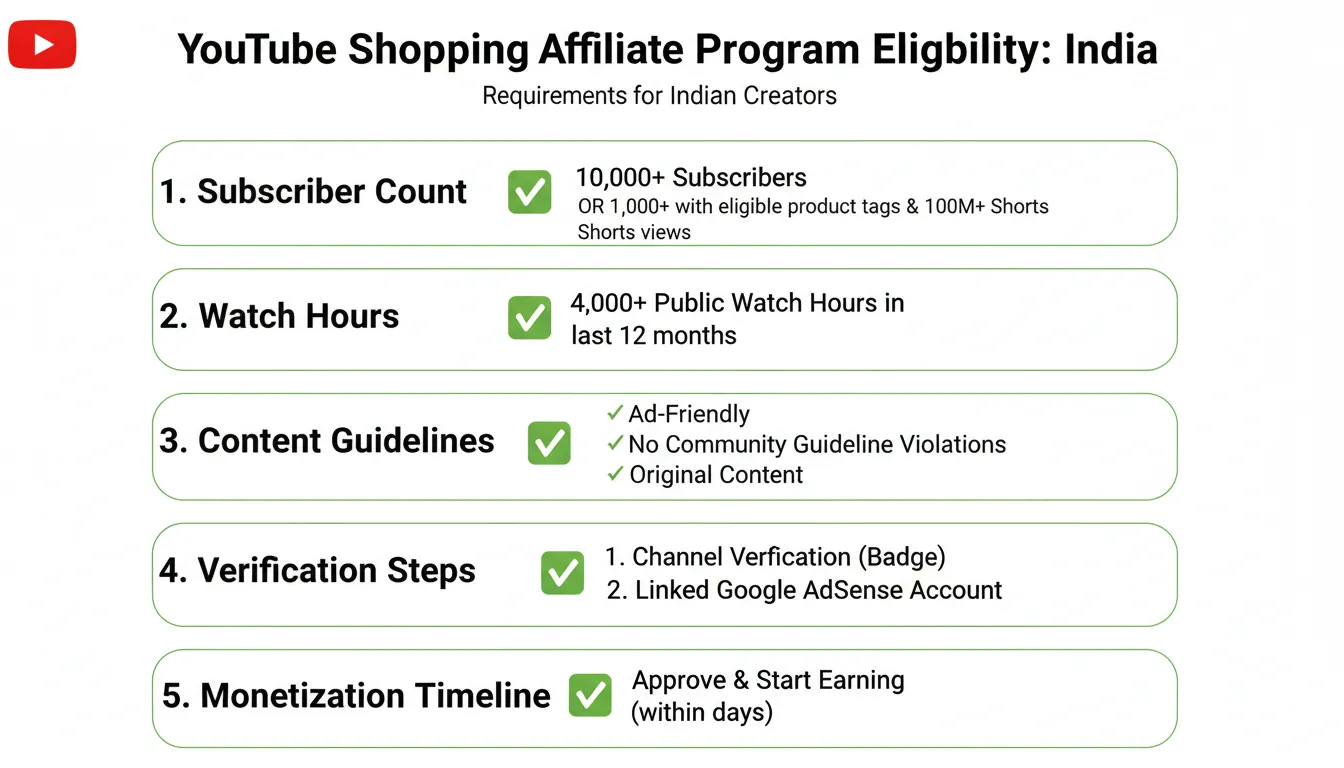
Before you can set up YouTube Shopping affiliate features, YouTube has strict eligibility criteria. These aren’t suggestions—they’re hard requirements. Missing even one can result in rejection or suspension of your program access.
Subscriber and Watch Hours Requirements:
As of 2026, YouTube requires a minimum of 1,000 subscribers and 4,000 watch hours in the last 12 months to be eligible for YouTube Partner Program (which is the foundation for Shopping features). However, YouTube Shopping specifically has additional tier-based requirements that may vary based on your content category and location.
For Indian creators, the baseline requirements are:
– Minimum 1,000 channel subscribers
– Minimum 4,000 watch hours in the previous 12 months
– Active channel for at least 6 months (consistently uploading content)
Some categories, particularly those with products that have higher transaction values, may require higher thresholds. For example, tech reviewers discussing expensive gadgets might face slightly higher subscriber requirements compared to creators in other niches.
Channel Monetization Status:
Your channel must be approved for YouTube Partner Program monetization already. You can’t jump directly to Shopping affiliate program if you’re not in the Partner Program. This means your channel must pass YouTube’s community guidelines review and monetization policies.
Account Standing Requirements:
YouTube checks multiple factors:
– No copyright strikes in the last 12 months
– No community guidelines violations
– No repeated policy violations
– Active compliance with YouTube Terms of Service
Even one active copyright strike can make you ineligible. Multiple community guidelines violations within a rolling 12-month period will also disqualify you.
Content Guidelines:
Your content must adhere to YouTube’s policies and be advertiser-friendly. This doesn’t mean you can only create corporate-friendly content, but it does mean avoiding:
– Excessive profanity without context
– Misleading or deceptive product reviews
– Content that encourages illegal activities
– Hate speech or discriminatory content
Location and Legal Requirements:
You must be a resident of India (or legally allowed to do business in India) and over 18 years old. You’ll need to provide tax information and banking details for commission payouts. India-specific tax compliance (GST if applicable) will be required.
Step-by-Step Setup Process for YouTube Shopping Affiliate Program
Once you’ve confirmed eligibility, the setup process involves several sequential steps. Rushing through these or missing details is a primary reason for rejections. Follow this process methodically.
Step 1: Verify Your YouTube Partner Program Status
First, confirm your channel is already in the YouTube Partner Program. Navigate to YouTube Studio > Monetization > Get Started (or if already enabled, review your status). You should see “Monetization Enabled” with a checkmark. If you don’t, you need to first apply for YouTube Partner Program and be approved before proceeding.
The Partner Program approval typically takes 1-3 weeks. YouTube reviews your channel’s compliance with their policies during this period. Don’t apply for Shopping affiliate program until you see this approval confirmed.
Step 2: Link Your Merchant Account
YouTube Shopping requires connection to a merchant account—typically Google Merchant Center connected to Google Shopping. Here’s how:
1. Go to [merchants.google.com](https://merchants.google.com)
2. Create or sign in to your Google Merchant Center account
3. Create a new “Business” profile with your actual business name or your creator brand name
4. Verify and claim your website (if you have one) or your YouTube channel as your business location
5. Add your business information, including business address in India, phone number, and email
This step is crucial. Your merchant account needs to be complete and verified before YouTube can link it to your channel for the Shopping features.
Step 3: Connect Google Merchant Center to YouTube
Now link your Merchant Center to your YouTube channel:
1. In YouTube Studio, go to Monetization > YouTube Shopping
2. Look for the option to “Link Merchant Center Account”
3. Select your Merchant Center profile
4. Authorize the connection
5. Review permissions and confirm
This authorization allows YouTube to pull product information from your Merchant Center feed when you tag products in videos.
Step 4: Complete Tax and Payment Information
Navigate to YouTube Studio > Settings > Channel > Monetization:
1. Add/update your tax information (Form 26AS or equivalent for Indian creators)
2. Set up AdSense account linked to your channel
3. Provide banking information for commission payouts (Indian bank account preferred, though international accounts can work)
4. Verify GST status if applicable (GST registration number if you have one)
YouTube uses this information to calculate and process affiliate commissions. Incomplete tax information is a major reason for account suspension or payment delays.
Step 5: Enable Product Tagging Features
With your merchant account connected, enable product tagging:
1. Go to Monetization > YouTube Shopping in Studio
2. Enable “Product Tagging”
3. Review guidelines on how to properly tag products
4. Confirm you understand the affiliate disclosure requirements
YouTube requires that you clearly disclose affiliate relationships. This is both a legal requirement (FTC guidelines) and YouTube’s policy. You’ll need to include affiliate disclosures in your video descriptions and through on-screen text when appropriate.
Step 6: Tag Products in Your First Video
Now comes the practical part. Create or select an existing video to tag products:
1. Open the video in YouTube Studio
2. Go to “Details” tab
3. Scroll to “Products” section
4. Click “Add Product”
5. Search for products from your Merchant Center or Amazon catalog
6. Select the product and confirm
7. Position the product card where it makes sense in your video timeline
8. Save changes
YouTube will review this content to ensure compliance before making it live to viewers.
Step 7: Add Affiliate Disclosures
This is legally mandatory. In your video description, add a line like:
“This video contains affiliate links. If you purchase through these links, I earn a small commission at no extra cost to you.”
You can also add on-screen graphics during relevant product mentions. Clear disclosure protects you legally and builds trust with your audience.
Key Takeaways
Common Rejection Reasons and How to Avoid Them
Understanding why creators get rejected helps you avoid the same mistakes. Here are the most common rejection reasons for YouTube Shopping affiliate programs:
1. Insufficient Watch Hours or Subscribers
The most common rejection. Creators sometimes apply before meeting the 4,000 watch hours requirement. Solution: Use YouTube Analytics to check your exact watch hours. Don’t apply until you’re confident you’ve exceeded the requirement. Many creators apply prematurely because they’re excited—patience pays off here.
2. Incomplete Merchant Account Setup
Your Google Merchant Center is created but not fully verified. YouTube can’t confirm your business legitimacy. Solution: Ensure your Merchant Center is completely verified. All fields are filled out. Your business address in India is confirmed. You’ve verified your website or YouTube channel as your business location.
3. Active Copyright Strikes
Even one active strike disqualifies you. This is a hard stop. Solution: Avoid using copyrighted music, clips, or images without proper licensing. If you have a strike, wait for it to age off (typically after 3-6 months of the strike expiring, though it stays on your record).
4. Poor Content Compliance
Videos contain content that violates YouTube’s advertising-friendly guidelines. This might include excessive profanity, violent content, or misleading product claims. Solution: Review YouTube’s advertiser-friendly content guidelines before applying. Make sure your top videos are completely compliant.
5. Weak Affiliate Disclosures
You’re not properly disclosing affiliate relationships. YouTube requires clear, upfront disclosure. Solution: Always include affiliate disclosures in your video description and on-screen where relevant. Don’t hide them in fine print.
6. Fake or Misleading Product Reviews
This is a serious issue. Promoting products you haven’t actually used or making false claims about them. Solution: Only promote products you genuinely use and believe in. Be honest about pros and cons. Your credibility is your most valuable asset.
7. Inconsistent or Low-Quality Content
Long gaps between uploads or consistently low-quality production. YouTube sees this as an inactive or uncommitted channel. Solution: Maintain a consistent upload schedule. Even weekly videos are better than sporadic uploads.
8. Tax Information Incomplete
Missing tax details or invalid banking information. Solution: Double-check all tax forms and banking details. If you’re unsure about GST registration, consult a local tax professional in India.
9. Channel Monetization Disabled or Under Review
Your channel’s monetization status is suspended or under review. You can’t access Shopping features if you’re not in good standing with Partner Program. Solution: Check your monetization status regularly. If under review, address any flagged issues immediately.
10. Attempting to Circumvent Policies
Using multiple accounts, attempting to artificially inflate watch hours, or other policy violations. Solution: Play by the rules. YouTube’s algorithm is sophisticated—shortcuts get caught and result in permanent bans.
Tools and Resources for YouTube Shopping Affiliate Setup
Several tools can help streamline your YouTube Shopping affiliate program setup and management:
YouTube Studio Analytics
Free, built-in tool. Shows your exact subscriber count, watch hours, and audience demographics. Use this to confirm you meet requirements before applying. Check it weekly to track your progress toward eligibility milestones.
Google Merchant Center
Free tool required for product integration. Manages your product catalog, feeds, and merchant information. This is non-negotiable—you must use it. Spend time learning its interface because you’ll use it regularly.
TubeBuddy or VidIQ
Paid tools ($5-15/month) that provide YouTube analytics, keyword research, and performance tracking. These aren’t required but help optimize content strategy. Useful for identifying high-performing content that you can tag with affiliate products.
Affiliate Disclosure Generators
Free online tools that help create compliant affiliate disclosures. Search “affiliate disclosure template” or use platform-specific ones. Keeps disclosures consistent across all videos.
Google Sheets for Product Tracking
Free. Create a spreadsheet tracking which products you’ve reviewed, which videos they appear in, commission rates, and performance. Simple but effective for managing multiple affiliate products.
Canva (Paid or Free)
Design tool for creating on-screen affiliate disclosure graphics. Templates available for creating professional-looking overlays.
Cost Breakdown for YouTube Shopping Affiliate Program in India:
| Component | Cost | Notes |
|———–|——|——-|
| YouTube Partner Program | Free | Required foundation |
| Google Merchant Center | Free | Required setup |
| Google AdSense Account | Free | Required for payouts |
| TubeBuddy/VidIQ (optional) | $5-15/month | Analytics & optimization |
| Website Domain (optional) | ₹100-500/year | Useful but not required |
| Video Editing Software | Free-$100/month | OBS Studio free, Adobe ₹600/month |
| Ring Light & Camera (initial) | ₹5,000-30,000 | One-time investment |
| Total Startup Cost | ₹0-50,000 | Core = Free; Optimization = ₹5,000-15,000 |
The beautiful part: YouTube Shopping affiliate program is completely free to join. All core tools are free. Optional paid tools enhance optimization but aren’t necessary.
Pros and Cons of YouTube Shopping Affiliate Program in India
Advantages:
✅ Zero Barrier to Entry – Completely free. No upfront costs compared to traditional business models.
✅ Passive Income Potential – Videos you create once generate commissions indefinitely as long as they remain relevant and discoverable.
✅ High Commission Rates – Amazon affiliate commission rates range from 2-10% depending on product category. Some specialized products pay higher.
✅ Aligned with Natural Content – You’re not selling anything artificial. You can promote products you already discuss and recommend.
✅ Scalable Revenue – One video can generate ongoing commissions. As your channel grows, revenue scales exponentially.
✅ Multiple Commission Streams – Combine Shopping affiliate with AdSense, sponsorships, and other monetization for diversified income.
✅ Improves Video SEO – Product tags can improve video discovery and watch time, helping your videos rank better in YouTube search.
✅ Viewer Trust – Viewers appreciate honest recommendations. When done right, affiliate promotions strengthen audience loyalty.
✅ Low Effort Integration – Once set up, adding product tags to videos takes less than 5 minutes per video.
Disadvantages:
❌ High Eligibility Bar – 4,000 watch hours and 1,000 subscribers aren’t trivial. Takes 6-12 months for most new creators.
❌ Commission Dependency on Conversions – You only earn when viewers actually purchase. High traffic doesn’t guarantee high income if conversion is low.
❌ Platform Risk – YouTube could change commission rates or discontinue
Advertisement
